1. locate and extract files in Z drive: Z:\Audio-Video-Images\Final On-Demand Products files\Case of the Month\2021\08_August (month name)
2. edit index.html and add google analytics code (below in orange) Between </style> and </head>
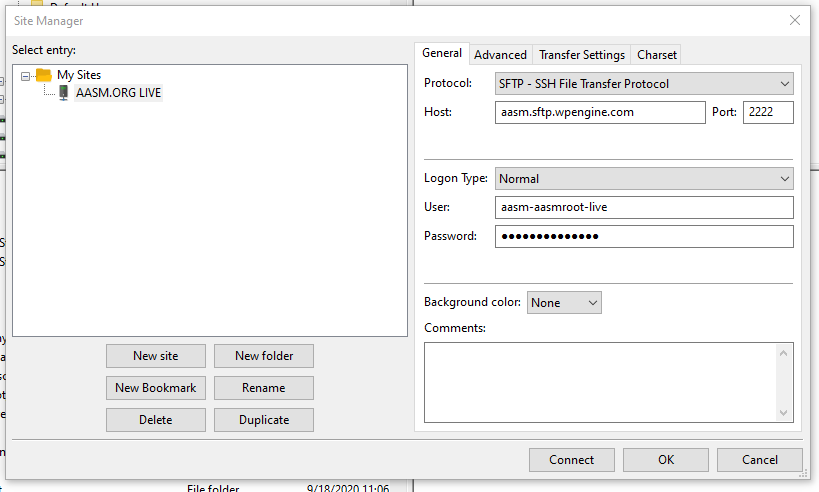
3, login to Filezilla and use below credentials
4. Copy the extracted files over FTP to this location http://aasm.org/resources/case/
5. send over updated URL
Copy the files over FTP to this location http://aasm.org/resources/case/
Create a folder for each month and email her back a link like this:
http://aasm.org/resources/case/07-2019/story.html *OLD URL
http://aasm.org/resources/case/11-2019/index.html#/ *Old URL (2020 cases)
https://aasm.org/resources/case/2024/01/index.html#/ *NEW URL (updated for 2021)
Also need to add Google analytics code in index.html *NEW URL (story_html5.html *OLD URL)
Between </style> and </head>
<!-- Global site tag (gtag.js) - Google Analytics -->
<script async src="https://www.googletagmanager.com/gtag/js?id=UA-16183461-26"></script>
<script>
window.dataLayer = window.dataLayer || [];
function gtag(){dataLayer.push(arguments);}
gtag('js', new Date());
gtag('config', 'UA-16183461-26');
</script>
FileZilla Site:
SFTP
SFTP Address: aasm.sftp.wpengine.com
username: aasm-aasmroot-live
Password: WordPre$$2017#
Port Number: 2222
Was this article helpful?
That’s Great!
Thank you for your feedback
Sorry! We couldn't be helpful
Thank you for your feedback
Feedback sent
We appreciate your effort and will try to fix the article