If you need to review a contacts SLEEP purchase history, see their registration information or pull a SLEEP meeting list, you can achieve that by logging into the Intranet and selecting SLEEP Meeting from the navigation menu that will appear.
If you need to see past events there is a drop down list that will let you select from past SLEEP events going all the way back to 2023 when we converted the SLEEP Meeting website.
1) Log in the http://Intranet with your AASM Login (the same one you use to sign into your computer).
2) Select "Events" from the top menu navigation.
3) Select "SLEEP Meeting from the sub menu navigation.
4) (OPTIONAL) Change which year's SLEEP Meeting from the drop down, highlighted in green in the image below.
5) (OPTIONAL) Use the Excel button to download the results into a .csv where you can filter, view or share them.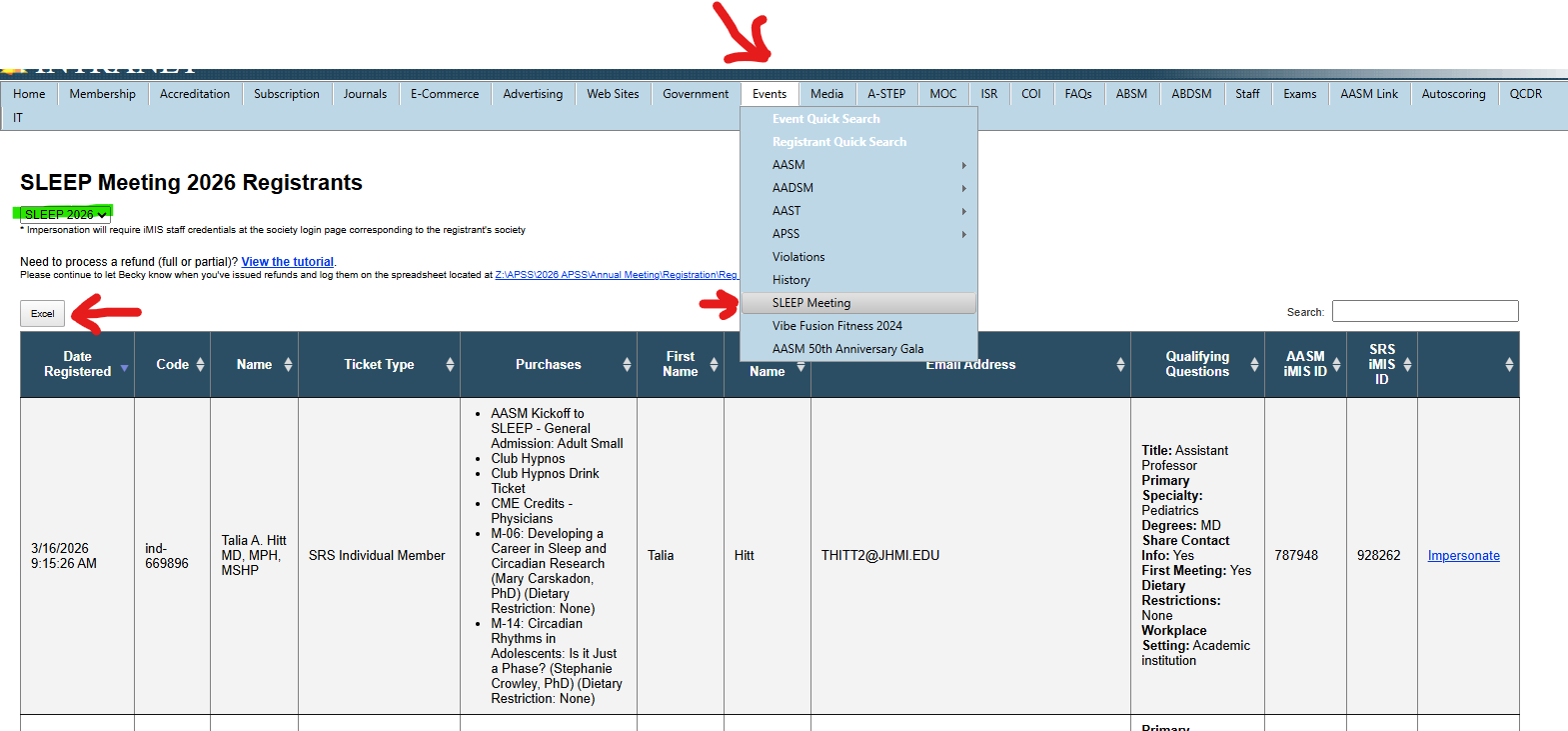
Was this article helpful?
That’s Great!
Thank you for your feedback
Sorry! We couldn't be helpful
Thank you for your feedback
Feedback sent
We appreciate your effort and will try to fix the article